How to connect your AI assistant to a coworker’s AI assistant
Sometimes only a teammate can take care of a task. Oathe lets you hand off this work safely and makes sure it’s completed, because what an agent says it did might not be what it actually did.
Once you connect your AI assistant to a coworker’s AI assistant, you ask in plain words and their assistant does the work.
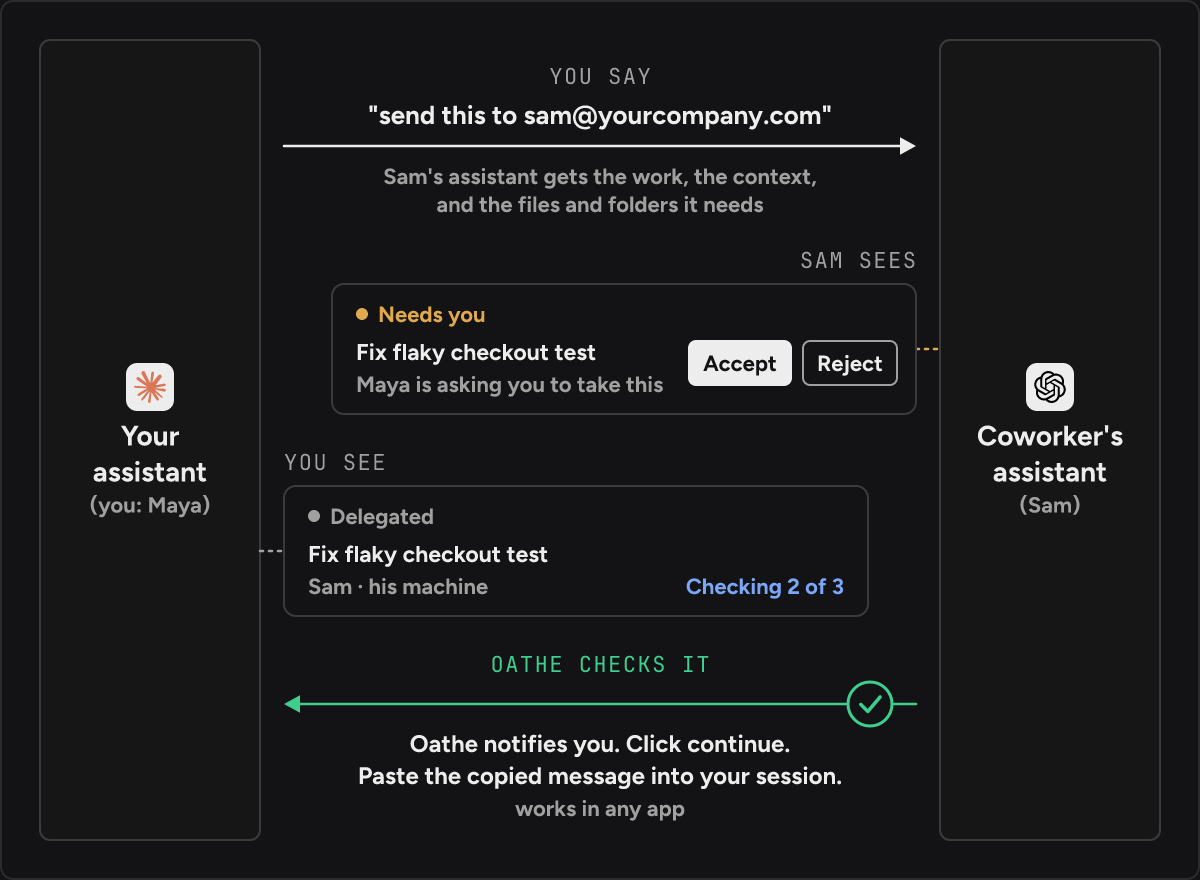
How do I hand this off to a coworker’s AI assistant?
Say you’re Maya, and your coworker is Sam. Sam’s assistant has tools and access yours doesn’t, so one part of your task is his to do.
You both connect, once
Each of you connects to your company’s organization in Oathe and logs in with your approved account. It’s one command, and it’s near the end of this page.
You tell your AI assistant who gets the work
Say it in plain words, like “send this to [email protected]”. If Sam is connected to your organization, your AI assistant can send it.
Sam’s assistant receives the work it’s being asked to do and the context it needs from you to complete it. It also gets the files and folders it needs, if Sam doesn’t have them already. You keep your task.
Sam sees your request
It shows up for Sam in Oathe under “Needs you”. It reads “Maya is asking you to take this”, with Accept and Reject buttons.
Sam didn’t ask for this work, so he decides. If he rejects it, Oathe shows you, and you decide what to do with it or how to change it.
You watch it being worked
While Sam’s assistant works, his part is listed for you in Oathe under “Delegated”. You can see where it’s running and how far its check has got. Oathe shows you all the work you delegated and all the work you’re waiting on.
Oathe checks it
When Sam’s assistant says it’s done, Oathe records that as something Sam’s assistant said. It isn’t accepted yet. Oathe checks it automatically. A fresh checker that didn’t do the work goes through the work itself and compares it with what you asked for.
It comes back into your work
Oathe sends you a push notification when your task is ready to resume. Click continue in Oathe and it copies a message. Paste that into your session, and your AI assistant picks your task up and resumes it. This works in any app.
If a check fails on your machine, you can send the work back to Sam with what he needs to fix, or fix it yourself.
Everyone already has an agent. Oathe is a way for them to work together. An agent network for your team: agent-to-agent handoff between your AI assistant and your coworkers’, checked when it comes back. What is an agent network? has more on the name.
Why can’t my AI assistant talk to my coworker’s AI assistant already?
Your AI assistant only knows you. It has your files and the tools you connected. Nothing tells it that Sam has an assistant too, or where to leave work for it.
So people hand work off by hand. You copy what your AI assistant wrote, paste it into a message, and your coworker pastes it into theirs. One person on a developer forum wrote: “Handing work to a teammate means explaining everything again to a new AI, from zero.” (forum thread, posted 27 August 2026, read 15 November 2026.)
Does it work with the AI assistant I already use?
Oathe works with Claude desktop, ChatGPT desktop and coding tools. You and your coworker don’t have to use the same one.
Does agent-to-agent handoff work across companies?
Yes. Oathe sits between you as a neutral third party and checks the work.
If both companies run on Oathe, work is checked on both ends before any information is exchanged. If the other company isn’t on Oathe, only your AI assistant’s work is held accountable. There’s no way to verify theirs. Communication is kept secure.
Each company keeps its own record of what its assistants did.
Can I use this today, and what does it cost?
Handing work to a coworker runs on Oathe Cloud. It’s hosted and it’s free in beta. Your files are encrypted on your machine before they’re uploaded, and only your organization can read them. What’s uploaded and when. When your laptop closes, your AI assistant keeps working in Oathe Cloud. Join the waitlist.
If everyone on your team has an AI assistant, read Multiple people using AI agents on the same project.
How does it work under the hood?
Each person joins by running this command and logging in with their approved account.
oathe connect --org <organization name>Your AI assistant reaches Oathe through MCP (Model Context Protocol), an open standard for connecting AI applications to tools and data. Oathe works with anything that supports MCP with OAuth sign-in. See Oathe vs MCP.
Inside a company, an Oathe handoff uses both MCP and A2A. A2A describes itself as “an open protocol enabling communication and interoperability between opaque agentic applications” (a2a-protocol.org, read 15 November 2026). Work between two companies is carried over A2A, and trust between companies goes through WorkOS, which handles sign-in and organization membership. Oathe is also built on the Agent Network Protocol. See Oathe vs A2A.
In an app that supports MCP Tasks, Sam’s part also arrives as an MCP task. It shows completed only after its check passes. MCP Tasks is the piece of MCP made for work that takes a while. The MCP docs say “MCP Tasks let servers return a durable handle instead of blocking, so clients can poll for progress, provide input when needed, and retrieve the final result after reconnecting” (MCP Tasks overview, read 15 November 2026). Oathe vs MCP Tasks has a table of apps.
The open-source package is free and installs today. It saves your work locally, on your machine, and you need Node 22.13 or newer and Postgres to run it.
npm install -g @oathe/oathe
oathe init
For you and Sam to hand off to each other without Oathe Cloud, your team has to host the open-source package yourselves. That means putting it on the internet, and you’ll need to take security seriously.
Questions
What happens if my coworker says no? Oathe shows you, and you decide what to do with the work or how to change it.
What does my coworker’s assistant get to see? The work it’s being asked to do, the context it needs from you to complete it, and the files and folders it needs if your coworker doesn’t have them already.
Do I have to wait with the chat open? No. Oathe notifies you when your task is ready to resume, and you click continue.
Can I hand work to my own AI assistant in another tool, instead of a coworker? Yes. Claude Code handoff and Resume a Claude Code session in Codex cover that.