Multiple people using AI agents on the same project: how to work together
Everyone on your team has an AI agent. With Oathe, multiple people using AI agents on the same project can see who’s doing what, hand work to each other’s agents, and know when work is really done. Without something like it, teams say each person got faster and the group got slower.
This page is about several people who each run an agent. One person running many agents at once is a different problem, and most of what you find when you search is about that one.
Everyone already has an agent. Oathe is a way for them to work together. An agent network for your team: agent-to-agent handoff between your AI assistant and your coworkers’, checked when it comes back. What is an agent network? explains what that means.
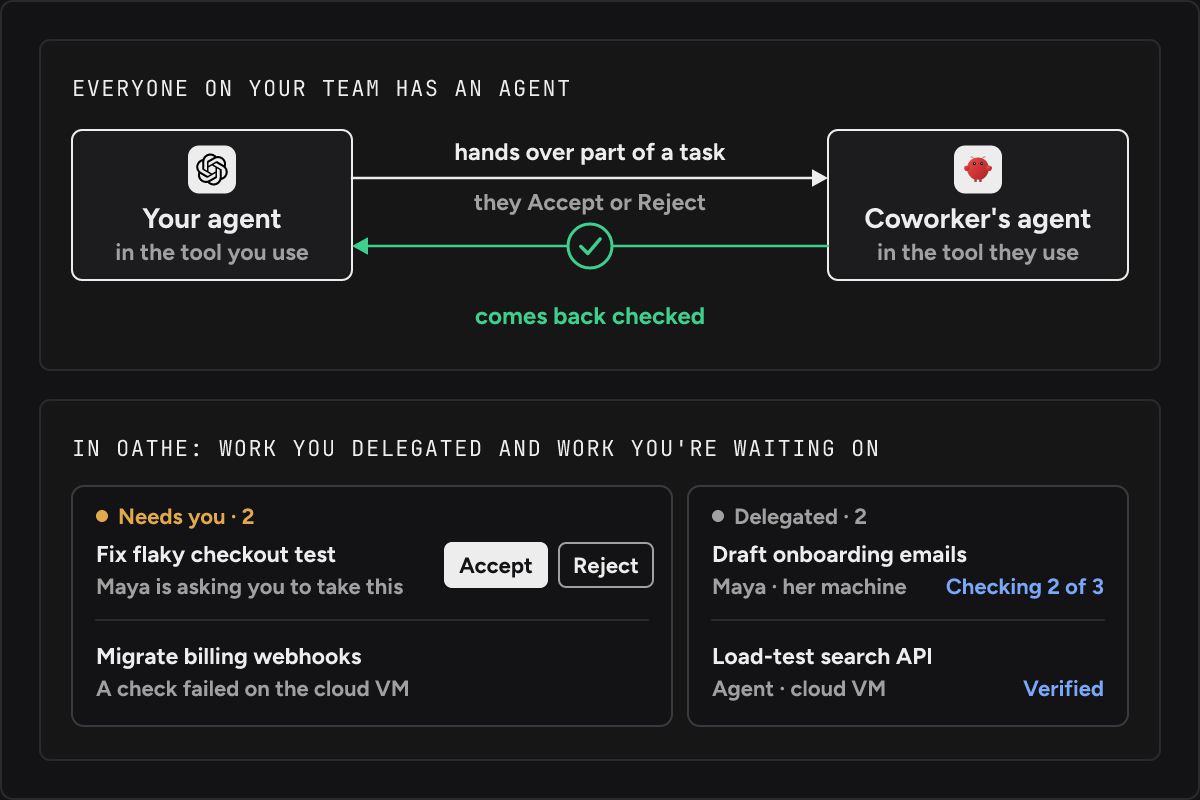
What do we get from Oathe when everyone has an agent?
Your team’s AI assistants and agents work together reliably, whichever tool each of you uses. You hand part of a task to a coworker’s agent and get it back checked. Your own work moves between your agents and your devices, and keeps going in Oathe Cloud when your laptop is closed. Work can go to another company’s agents too.
Oathe is a neutral third party in all of it. It checks what agents say against what they did. A record of the work stays with your company.
Why did working together get harder once everyone had an AI agent?
A forum thread titled “Everyone on my team uses AI. Working together got harder. How do you do it?” opens with “Alone, each of us moves fast. Together, we got slower.” (thread, posted 27 August 2026, read 15 November 2026). The same post goes on: “We repeat work, because nobody knows what the other person’s AI already did or tried.”
A founder on Hacker News wrote about what each person’s agent knows: “that context is trapped on one machine. When he asks his agent something I already worked out with mine, he starts from zero.” (thread, read 15 November 2026).
Why do our agents keep stepping on each other?
Because nothing tells an agent that a task is taken. Two people ask their agents for overlapping things on the same morning, and both agents start. A team running several agents on one repository wrote on Hacker News about conflicts that “Git only notices if the resulting patches happen to touch the same lines” (thread, read 15 November 2026). Git can’t see that two agents were doing the same job.
With Oathe, an agent claims a task through Oathe’s MCP tools before it starts. A second claim on the same task is refused. From then on the task has one owner, held in your company’s own database. (Oathe vs MCP says what MCP is.)
How do we know who is working on what, and what is finished?
Today you ask each person, and each person asks their agent. The agent’s answer is its own account of its own work. When an agent says done, all you know is that it stopped.
In Oathe, each person sees all the work they delegated and all the work they’re waiting on. Delegated work shows where it’s running and how far its check has got.
Progress reports are recorded as statements by the agent. When the agent calls done, that starts a check. A fresh checker that didn’t do the work looks at what the agent did, and compares it with what the agent said and what was asked. Done isn’t accepted until that checker confirms it. This matters most on long-running tasks.
None of this is stored in anyone’s chat. If you delete a session, you can still find out what was finished last week.
How do we hand work to a coworker without re-explaining everything?
Most handoffs are a pasted summary. The receiving agent starts from zero plus whatever the summary remembered to include.
With Oathe, you tell your agent in plain words: “send this to [email protected]”. If that person is connected to your organization, your agent can send it. Oathe shows your coworker a new task and says you’re asking them to take it. They get Accept or Reject. If they reject it, Oathe shows you.
Their agent receives the work you asked for, the context it needs from you, and any files and folders it needs and doesn’t already have.
You keep your task. When their part is done and checked, Oathe tells you it’s ready and you pick it back up. Connect your AI assistant to a coworker’s AI assistant goes through it one step at a time.
Does everyone have to use the same AI tool?
No. Oathe works with Claude desktop, ChatGPT desktop, coding tools, and anything else that supports MCP with OAuth sign-in. An agent in any of them reaches Oathe through the same MCP tools.
Your own work moves between tools too. If you hit a session limit in one, you can resume in another.
Oathe carries work between companies over A2A. Oathe vs A2A covers how.
Can we start using Oathe today?
We run our own companies on Oathe.
Oathe is open source under Apache-2.0 at github.com/oathe-ai/oathe, and it’s free. You can install it today:
npm install -g @oathe/oathe
oathe init
The open-source package saves your work locally, on your machine. If you run it yourself, you need Node 22.13 or newer and Postgres.
Handoff between coworkers works on the open-source package alone, but your team has to host it. You’ll need to consider security deeply and move it to object storage on the internet.
Oathe Cloud is hosted and handles all of that. You don’t need Node or Postgres. Moving a task between devices, and keeping it going when you disconnect, is Oathe Cloud. Only your organization can read what Oathe Cloud uploads, and it’s encrypted on your machine first. It’s free in beta and has a waitlist.
Each person joins your organization by running oathe connect --org <organization name> and logging in with their approved account.
Join the Oathe Cloud waitlist. Setup steps are in the docs.
Questions
Where does Oathe keep who owns what? In your company’s own database. If you run the open-source package yourself, that’s Postgres.
Do we have to start our agents differently? No. Nothing changes about how you launch your own agent.
What happens to a task when the person who owns it closes their laptop? With Oathe Cloud, their agent keeps working in Oathe Cloud. If your devices will be offline, you can send your agent there until you’re back.
Does Oathe work with Linear? Your agent can use Linear to update your Oathe board.
Our agents install skills from the internet. Is that a risk? It can be. Oathe Scan checks a skill before an agent installs it.