How to resume a Claude Code session in Codex
Hit your session limit in Claude Code? Resume in Codex seamlessly. With Oathe you run codex in the same folder, say continue and your task’s name, and Codex picks up where Claude Code stopped. You don’t re-explain anything.
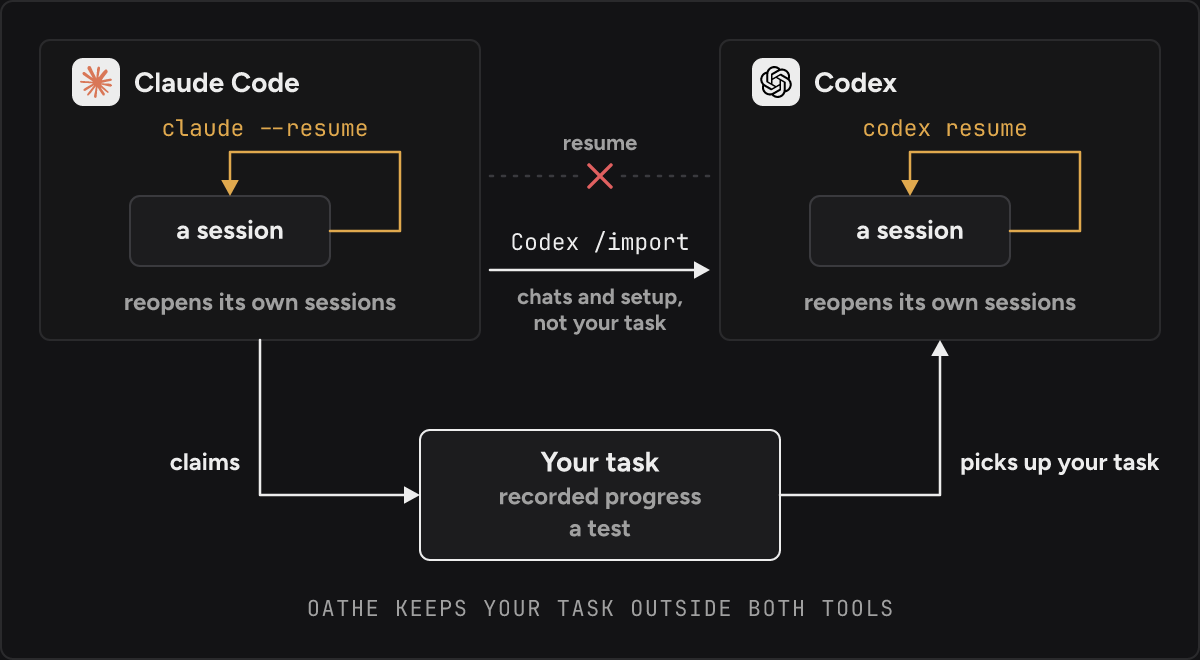
The two tools’ own resume commands each stay inside their own tool. claude --resume reopens Claude Code sessions, and codex resume reopens Codex sessions. Codex’s /import copies your old chats across.
How do I pick up the same task in Codex?
Resume your task with Oathe. Oathe keeps it outside both tools, so it’s still there when a session ends. It holds who owns your task, what’s been recorded about it, and a test that decides whether it’s finished.
Install once. The open-source package is free, needs no account, and saves your work locally, on your machine. It’s yours to run, so you need Node 22.13 or newer and Postgres running.
npm install -g @oathe/oathe
oathe init
Start Claude Code with claude and work as usual. Your agent claims your task through the oathe_* MCP tools when the work begins, or you claim it from the terminal.
oathe claim fix-login "users can sign in again"When Claude Code stops, run codex in the same folder. Codex starts a normal session and shows what work exists in this folder. Nothing resumes by itself. Say this.
continue fix-loginCodex picks up your task with what’s done, what’s left and its test. You paste nothing. Codex reads the diff and reruns the test before trusting what the last agent reported.
To see the tasks in a folder at any time, run this.
oathe lsIt works in the other direction too. Start in Codex, stop, run claude in the same folder.
What does claude --resume do?
From the Claude Code docs, read 15 November 2026 (Manage sessions):
claude --continue“Reopens the most recent session in the current directory”.claude --resume“Opens the session picker”. You can also pass a name or a session ID.
Sessions are saved as transcript files on your machine, under ~/.claude/projects/. Every way of resuming on that page opens one of those Claude Code transcripts.
The docs also say what you don’t get back. After a compaction, “The messages that the last compaction summarized aren’t loaded again.” And “a tool that was still running when the previous process ended, for example in a crash, doesn’t get rerun when you resume.”
What does codex resume do?
From the Codex CLI reference, read 15 November 2026 (OpenAI docs): codex resume will “Continue a previous interactive session by ID or resume the most recent chat.” codex resume --last skips the picker and resumes “the most recent chat from the current working directory”. Add --all to look in other directories.
These are Codex sessions. Cursor’s CLI works the same way: agent resume, --continue or --resume [thread id] reopen Cursor’s own conversations (Cursor docs, read 15 November 2026).
How do I switch from Claude Code to Codex and keep my chats?
Codex has an import. Type /import in an idle Codex CLI session, choose Claude Code, and select what to bring. “Codex CLI imports up to 50 chats from the last 30 days.” It also brings instruction files, settings, skills, MCP server configuration and hooks, and it leaves your Claude Code setup unchanged (Import from another agent, read 15 November 2026).
The same page covers the ChatGPT desktop app. It imports from Claude Code, Claude Cowork or Cursor, and can “keep imported work in sync with automatic updates”. The last step there reads: “After the import finishes, open an imported project or chat to continue working.”
Run it once when you move your setup over. For a task that stopped halfway, you get the old chat in Codex and can carry on in it. The chat doesn’t hold a list of what was finished, or a test that says so.
The import goes one direction. We searched on 15 November 2026 and didn’t find an official import from Codex into Claude Code.
claude --resume vs codex resume vs Codex /import: what carries over?
claude --resume | codex resume | Codex /import | Oathe | |
|---|---|---|---|---|
| Crosses from Claude Code to Codex | No | No | Yes, one direction | Yes, either direction |
| What the next agent starts from | The Claude Code transcript | The Codex transcript | Imported chats and setup | Your claimed task, recorded progress and a test |
| The old conversation | Reopened, minus what compaction summarized | Reopened | Up to 50 chats, last 30 days | Stays in Claude Code |
| Done is checked by something that didn’t do the work | No | No | No | Yes |
Oathe doesn’t copy the conversation. If you need the old chat in Codex, use /import.
Can I resume on another device, or hand off to a coworker?
Yes, with Oathe Cloud. The open-source package saves your work on the machine you’re using. Moving a task between devices, and keeping it going when you disconnect, is Oathe Cloud. When your laptop closes, your agent keeps working in Oathe Cloud. Only your organization can read what Oathe Cloud uploads, and it’s encrypted on your machine first. It’s free in beta, and you don’t need Node or Postgres. Join the waitlist.
To pass work to another person, see Connect your AI assistant to a coworker’s AI assistant. That runs on Oathe Cloud too. Without it, someone on your team has to host Oathe for both of you and look after its security.
Claude Code handoff covers what a handoff note carries and how done gets checked.
Resuming is one use of Oathe. Oathe is an agent network, so everyone’s AI assistants and agents can work together reliably. Work moves between your agents, your devices, your coworkers, the cloud and other companies. A neutral third party checks what agents say against what they did.
Questions
Can Codex open a Claude Code session file directly?
codex resume can’t. /import reads recent Claude Code chats and brings them into Codex as chats.
Does claude --resume bring everything back after a crash? It reopens the conversation. The docs say messages a compaction already summarized aren’t loaded again, and a tool that was running when the process ended isn’t rerun.
Do I lose my Claude Code conversation if I continue in Codex with Oathe?
No. The transcript stays where Claude Code saved it, and claude --resume still opens it. Codex gets your task.
Does it work with Cursor? Yes. Oathe works with Claude Code, Codex and Cursor.
Is it free and open source? Yes. The open-source package is free, under Apache-2.0 at github.com/oathe-ai/oathe. Oathe Cloud is free in beta. Setup steps are in the docs.